"/><stop offset="1" stop-color="rgb(255, 100, 165)"/></linearGradient></defs><g d="M 0 0 L 60 0 L 60 60 L 0 60 Z M 9 60 C 4.029 60 0 55.971 0 51 L 0 9 C 0 4.029 4.029 0 9 0 L 51 0 C 55.971 0 60 4.029 60 9 L 60 51 C 60 55.971 55.971 60 51 60 Z M 42.974 11.215 C 43.145 11.215 43.331 11.198 43.535 11.164 C 43.773 11.096 44.011 10.942 44.249 10.704 C 44.385 10.568 44.538 10.5 44.708 10.5 C 44.98 10.5 45.184 10.653 45.319 10.959 L 49.347 18.412 C 49.449 18.616 49.5 18.77 49.5 18.872 C 49.5 19.144 49.364 19.348 49.092 19.484 L 46.951 20.658 C 46.747 20.76 46.577 20.811 46.441 20.811 C 46.237 20.811 46.05 20.658 45.88 20.352 L 45.727 20.046 C 44.878 18.344 43.654 17.136 42.057 16.422 C 40.46 15.707 38.624 15.349 36.551 15.349 L 34.053 15.349 L 34.053 41.588 C 34.053 42.949 34.308 44.106 34.818 45.059 C 35.327 45.978 36.228 46.437 37.519 46.437 L 37.876 46.437 C 38.386 46.437 38.641 46.692 38.641 47.203 L 38.641 48.734 C 38.641 49.245 38.386 49.5 37.876 49.5 L 22.174 49.5 C 21.664 49.5 21.41 49.245 21.41 48.734 L 21.41 47.203 C 21.41 46.692 21.665 46.437 22.175 46.437 L 22.481 46.437 C 23.772 46.437 24.673 45.978 25.182 45.059 C 25.692 44.106 25.947 42.949 25.947 41.588 L 25.947 15.349 L 23.449 15.349 C 21.376 15.349 19.541 15.707 17.943 16.421 C 16.346 17.136 15.122 18.344 14.273 20.046 L 14.12 20.352 C 13.95 20.658 13.763 20.812 13.559 20.812 C 13.423 20.812 13.253 20.761 13.049 20.659 L 10.908 19.484 C 10.636 19.348 10.5 19.144 10.5 18.872 C 10.5 18.77 10.551 18.616 10.653 18.412 L 14.68 10.959 C 14.85 10.653 15.054 10.5 15.292 10.5 C 15.462 10.5 15.615 10.568 15.751 10.704 C 15.989 10.943 16.21 11.096 16.414 11.164 C 16.651 11.197 16.855 11.215 17.026 11.215 Z" fill="transparent" height="60px" id="wnIU_RgRP" width="60px"><path d="M 0 0 L 60 0 L 60 60 L 0 60 Z" fill="transparent" height="60px" id="g9vASv_I0" width="60px"/><path d="M 9 60 C 4.029 60 0 55.971 0 51 L 0 9 C 0 4.029 4.029 0 9 0 L 51 0 C 55.971 0 60 4.029 60 9 L 60 51 C 60 55.971 55.971 60 51 60 Z" fill="rgb(254, 254, 254)" height="60px" id="Zi9UWh_Wu" width="60px"/><g d="M 32.474 0.715 C 32.645 0.715 32.831 0.698 33.035 0.664 C 33.273 0.596 33.511 0.442 33.749 0.204 C 33.885 0.068 34.038 0 34.208 0 C 34.48 0 34.684 0.153 34.819 0.459 L 38.847 7.912 C 38.949 8.116 39 8.27 39 8.372 C 39 8.644 38.864 8.848 38.592 8.984 L 36.451 10.158 C 36.247 10.26 36.077 10.311 35.941 10.311 C 35.737 10.311 35.55 10.158 35.38 9.852 L 35.227 9.546 C 34.378 7.844 33.154 6.636 31.557 5.922 C 29.96 5.207 28.124 4.849 26.051 4.849 L 23.553 4.849 L 23.553 31.088 C 23.553 32.449 23.808 33.606 24.318 34.559 C 24.827 35.478 25.728 35.937 27.019 35.937 L 27.376 35.937 C 27.886 35.937 28.141 36.192 28.141 36.703 L 28.141 38.234 C 28.141 38.745 27.886 39 27.376 39 L 11.674 39 C 11.164 39 10.91 38.745 10.91 38.234 L 10.91 36.703 C 10.91 36.192 11.165 35.937 11.675 35.937 L 11.981 35.937 C 13.272 35.937 14.173 35.478 14.682 34.559 C 15.192 33.606 15.447 32.449 15.447 31.088 L 15.447 4.849 L 12.949 4.849 C 10.876 4.849 9.041 5.207 7.443 5.921 C 5.846 6.636 4.622 7.844 3.773 9.546 L 3.62 9.852 C 3.45 10.158 3.263 10.312 3.059 10.312 C 2.923 10.312 2.753 10.261 2.549 10.159 L 0.408 8.984 C 0.136 8.848 0 8.644 0 8.372 C 0 8.27 0.051 8.116 0.153 7.912 L 4.18 0.459 C 4.35 0.153 4.554 0 4.792 0 C 4.962 0 5.115 0.068 5.251 0.204 C 5.489 0.443 5.71 0.596 5.914 0.664 C 6.151 0.697 6.355 0.715 6.526 0.715 Z" fill="transparent" height="39px" id="sJZgEX_6w" transform="translate(10.5 10.5)" width="39px"><path d="M 32.474 0.715 C 32.645 0.715 32.831 0.698 33.035 0.664 C 33.273 0.596 33.511 0.442 33.749 0.204 C 33.885 0.068 34.038 0 34.208 0 C 34.48 0 34.684 0.153 34.819 0.459 L 38.847 7.912 C 38.949 8.116 39 8.27 39 8.372 C 39 8.644 38.864 8.848 38.592 8.984 L 36.451 10.158 C 36.247 10.26 36.077 10.311 35.941 10.311 C 35.737 10.311 35.55 10.158 35.38 9.852 L 35.227 9.546 C 34.378 7.844 33.154 6.636 31.557 5.922 C 29.96 5.207 28.124 4.849 26.051 4.849 L 23.553 4.849 L 23.553 31.088 C 23.553 32.449 23.808 33.606 24.318 34.559 C 24.827 35.478 25.728 35.937 27.019 35.937 L 27.376 35.937 C 27.886 35.937 28.141 36.192 28.141 36.703 L 28.141 38.234 C 28.141 38.745 27.886 39 27.376 39 L 11.674 39 C 11.164 39 10.91 38.745 10.91 38.234 L 10.91 36.703 C 10.91 36.192 11.165 35.937 11.675 35.937 L 11.981 35.937 C 13.272 35.937 14.173 35.478 14.682 34.559 C 15.192 33.606 15.447 32.449 15.447 31.088 L 15.447 4.849 L 12.949 4.849 C 10.876 4.849 9.041 5.207 7.443 5.921 C 5.846 6.636 4.622 7.844 3.773 9.546 L 3.62 9.852 C 3.45 10.158 3.263 10.312 3.059 10.312 C 2.923 10.312 2.753 10.261 2.549 10.159 L 0.408 8.984 C 0.136 8.848 0 8.644 0 8.372 C 0 8.27 0.051 8.116 0.153 7.912 L 4.18 0.459 C 4.35 0.153 4.554 0 4.792 0 C 4.962 0 5.115 0.068 5.251 0.204 C 5.489 0.443 5.71 0.596 5.914 0.664 C 6.151 0.697 6.355 0.715 6.526 0.715 Z" fill="url(%23KbpzL6PmD-1929859876-linear-gradient)" height="38.999999999999986px" id="KbpzL6PmD" width="39px"/></g></g></svg>)
"/><stop offset="1" stop-color="rgb(255, 100, 165)"/></linearGradient></defs><g d="M 42.974 11.215 C 43.145 11.215 43.331 11.198 43.535 11.164 C 43.773 11.096 44.011 10.942 44.249 10.704 C 44.385 10.568 44.538 10.5 44.708 10.5 C 44.98 10.5 45.184 10.653 45.319 10.959 L 49.347 18.412 C 49.449 18.616 49.5 18.77 49.5 18.872 C 49.5 19.144 49.364 19.348 49.092 19.484 L 46.951 20.658 C 46.747 20.76 46.577 20.811 46.441 20.811 C 46.237 20.811 46.05 20.658 45.88 20.352 L 45.727 20.046 C 44.878 18.344 43.654 17.136 42.057 16.422 C 40.46 15.707 38.624 15.349 36.551 15.349 L 34.053 15.349 L 34.053 41.588 C 34.053 42.949 34.308 44.106 34.818 45.059 C 35.327 45.978 36.228 46.437 37.519 46.437 L 37.876 46.437 C 38.386 46.437 38.641 46.692 38.641 47.203 L 38.641 48.734 C 38.641 49.245 38.386 49.5 37.876 49.5 L 22.174 49.5 C 21.664 49.5 21.41 49.245 21.41 48.734 L 21.41 47.203 C 21.41 46.692 21.665 46.437 22.175 46.437 L 22.481 46.437 C 23.772 46.437 24.673 45.978 25.182 45.059 C 25.692 44.106 25.947 42.949 25.947 41.588 L 25.947 15.349 L 23.449 15.349 C 21.376 15.349 19.541 15.707 17.943 16.421 C 16.346 17.136 15.122 18.344 14.273 20.046 L 14.12 20.352 C 13.95 20.658 13.763 20.812 13.559 20.812 C 13.423 20.812 13.253 20.761 13.049 20.659 L 10.908 19.484 C 10.636 19.348 10.5 19.144 10.5 18.872 C 10.5 18.77 10.551 18.616 10.653 18.412 L 14.68 10.959 C 14.85 10.653 15.054 10.5 15.292 10.5 C 15.462 10.5 15.615 10.568 15.751 10.704 C 15.989 10.943 16.21 11.096 16.414 11.164 C 16.651 11.197 16.855 11.215 17.026 11.215 Z" fill="transparent" height="60px" id="ENy7giQS1" transform="translate(-9 -9)" width="60px"><path d="M 0 0 L 60 0 L 60 60 L 0 60 Z" display="none" fill="transparent" height="60px" id="ESka27RLq" width="60px"/><path d="M 9 60 C 4.029 60 0 55.971 0 51 L 0 9 C 0 4.029 4.029 0 9 0 L 51 0 C 55.971 0 60 4.029 60 9 L 60 51 C 60 55.971 55.971 60 51 60 Z" display="none" fill="rgb(254, 254, 254)" height="60px" id="GxreBo0Hb" width="60px"/><g d="M 32.474 0.715 C 32.645 0.715 32.831 0.698 33.035 0.664 C 33.273 0.596 33.511 0.442 33.749 0.204 C 33.885 0.068 34.038 0 34.208 0 C 34.48 0 34.684 0.153 34.819 0.459 L 38.847 7.912 C 38.949 8.116 39 8.27 39 8.372 C 39 8.644 38.864 8.848 38.592 8.984 L 36.451 10.158 C 36.247 10.26 36.077 10.311 35.941 10.311 C 35.737 10.311 35.55 10.158 35.38 9.852 L 35.227 9.546 C 34.378 7.844 33.154 6.636 31.557 5.922 C 29.96 5.207 28.124 4.849 26.051 4.849 L 23.553 4.849 L 23.553 31.088 C 23.553 32.449 23.808 33.606 24.318 34.559 C 24.827 35.478 25.728 35.937 27.019 35.937 L 27.376 35.937 C 27.886 35.937 28.141 36.192 28.141 36.703 L 28.141 38.234 C 28.141 38.745 27.886 39 27.376 39 L 11.674 39 C 11.164 39 10.91 38.745 10.91 38.234 L 10.91 36.703 C 10.91 36.192 11.165 35.937 11.675 35.937 L 11.981 35.937 C 13.272 35.937 14.173 35.478 14.682 34.559 C 15.192 33.606 15.447 32.449 15.447 31.088 L 15.447 4.849 L 12.949 4.849 C 10.876 4.849 9.041 5.207 7.443 5.921 C 5.846 6.636 4.622 7.844 3.773 9.546 L 3.62 9.852 C 3.45 10.158 3.263 10.312 3.059 10.312 C 2.923 10.312 2.753 10.261 2.549 10.159 L 0.408 8.984 C 0.136 8.848 0 8.644 0 8.372 C 0 8.27 0.051 8.116 0.153 7.912 L 4.18 0.459 C 4.35 0.153 4.554 0 4.792 0 C 4.962 0 5.115 0.068 5.251 0.204 C 5.489 0.443 5.71 0.596 5.914 0.664 C 6.151 0.697 6.355 0.715 6.526 0.715 Z" fill="transparent" height="39px" id="ZZtf7bnpg" transform="translate(10.5 10.5)" width="39px"><path d="M 32.474 0.715 C 32.645 0.715 32.831 0.698 33.035 0.664 C 33.273 0.596 33.511 0.442 33.749 0.204 C 33.885 0.068 34.038 0 34.208 0 C 34.48 0 34.684 0.153 34.819 0.459 L 38.847 7.912 C 38.949 8.116 39 8.27 39 8.372 C 39 8.644 38.864 8.848 38.592 8.984 L 36.451 10.158 C 36.247 10.26 36.077 10.311 35.941 10.311 C 35.737 10.311 35.55 10.158 35.38 9.852 L 35.227 9.546 C 34.378 7.844 33.154 6.636 31.557 5.922 C 29.96 5.207 28.124 4.849 26.051 4.849 L 23.553 4.849 L 23.553 31.088 C 23.553 32.449 23.808 33.606 24.318 34.559 C 24.827 35.478 25.728 35.937 27.019 35.937 L 27.376 35.937 C 27.886 35.937 28.141 36.192 28.141 36.703 L 28.141 38.234 C 28.141 38.745 27.886 39 27.376 39 L 11.674 39 C 11.164 39 10.91 38.745 10.91 38.234 L 10.91 36.703 C 10.91 36.192 11.165 35.937 11.675 35.937 L 11.981 35.937 C 13.272 35.937 14.173 35.478 14.682 34.559 C 15.192 33.606 15.447 32.449 15.447 31.088 L 15.447 4.849 L 12.949 4.849 C 10.876 4.849 9.041 5.207 7.443 5.921 C 5.846 6.636 4.622 7.844 3.773 9.546 L 3.62 9.852 C 3.45 10.158 3.263 10.312 3.059 10.312 C 2.923 10.312 2.753 10.261 2.549 10.159 L 0.408 8.984 C 0.136 8.848 0 8.644 0 8.372 C 0 8.27 0.051 8.116 0.153 7.912 L 4.18 0.459 C 4.35 0.153 4.554 0 4.792 0 C 4.962 0 5.115 0.068 5.251 0.204 C 5.489 0.443 5.71 0.596 5.914 0.664 C 6.151 0.697 6.355 0.715 6.526 0.715 Z" fill="url(%23r4oRpS1Kd-703919304-linear-gradient)" height="38.999999999999986px" id="r4oRpS1Kd" width="39px"/></g></g></svg>)
7 Ways to Collect Client Feedback That Actually Shows You What They Mean
Stop playing 20 questions over email. Learn how to get client feedback that shows exactly what they mean—with methods that eliminate "make it pop" requests forever.

Jon Sorrentino
Talki Co-Founder
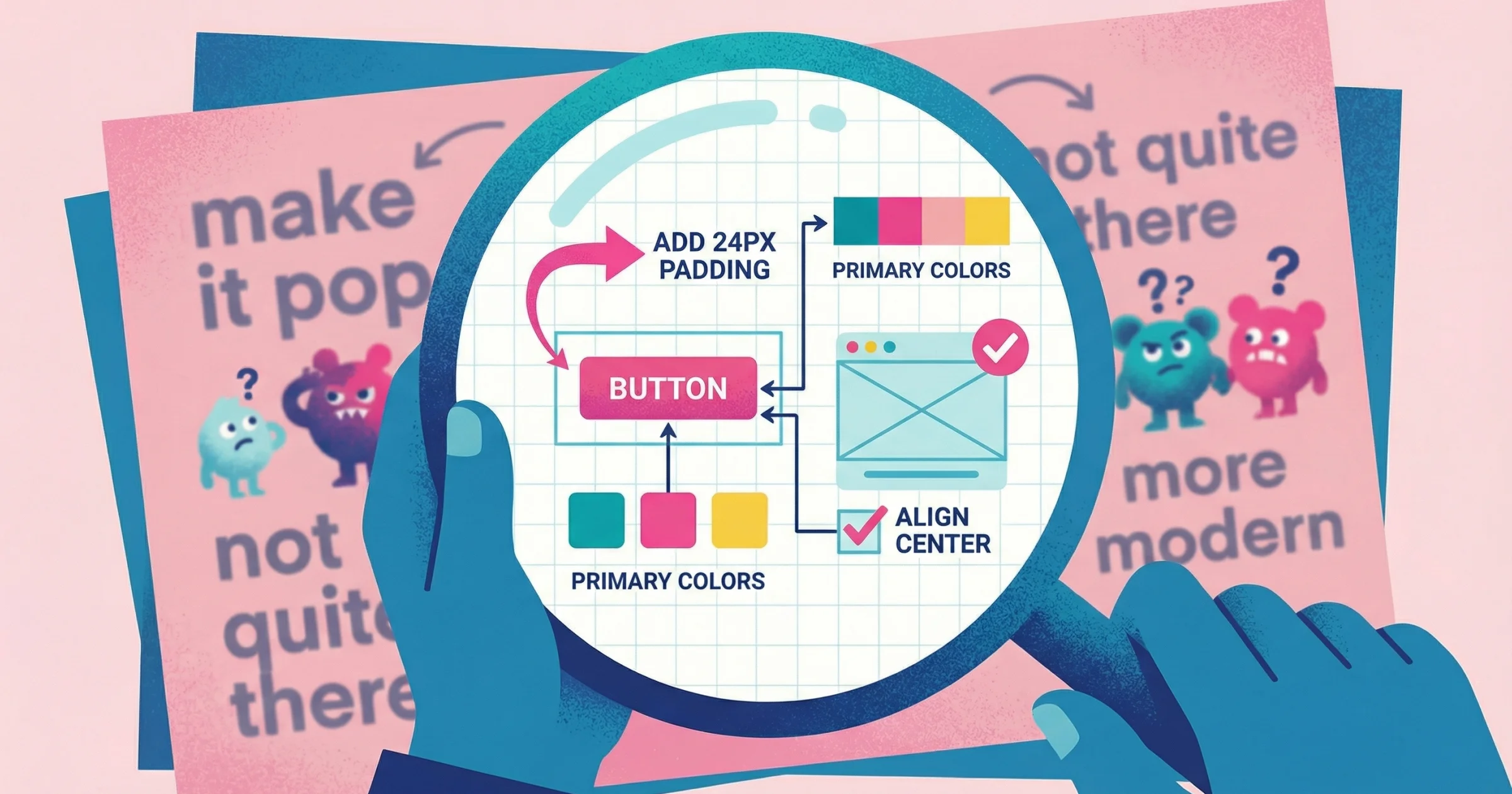
"Can you make it pop more?" "It's not quite there yet." "I'll know it when I see it."
If you've freelanced or run an agency for more than a month, you've received feedback like this. After 15 years leading design teams for brands like PepsiCo, Barstool Sports, and VICE—and the last five years working independently with agencies, SaaS companies, and startups—I can tell you: the problem isn't that clients are difficult. It's that written feedback is a terrible medium for communicating visual preferences.
Learning how to get client feedback that actually shows you what they mean is the difference between profitable projects and revision spirals.
Most advice on collecting client feedback focuses on surveys, NPS scores, and support tickets. Those methods work for measuring satisfaction at scale—but they fail completely when you need a client to explain what "make it more modern" actually means.
For a broader look at feedback collection beyond client work, see our guide on how to collect customer feedback.
Why Written Feedback Fails for Creative Work
When clients type feedback, they're translating visual reactions into words. That translation loses critical information.
An MIT Design Research study found that teams using visual feedback tools had 62% fewer misunderstandings than those relying on text-only comments. The reason? On-screen annotations and video walkthroughs capture nuances that written descriptions simply can't convey.
Consider what "make it pop" might actually mean:
The contrast is too low
They want brighter accent colors
The hierarchy isn't clear
It needs more whitespace
They saw a competitor's site they liked better
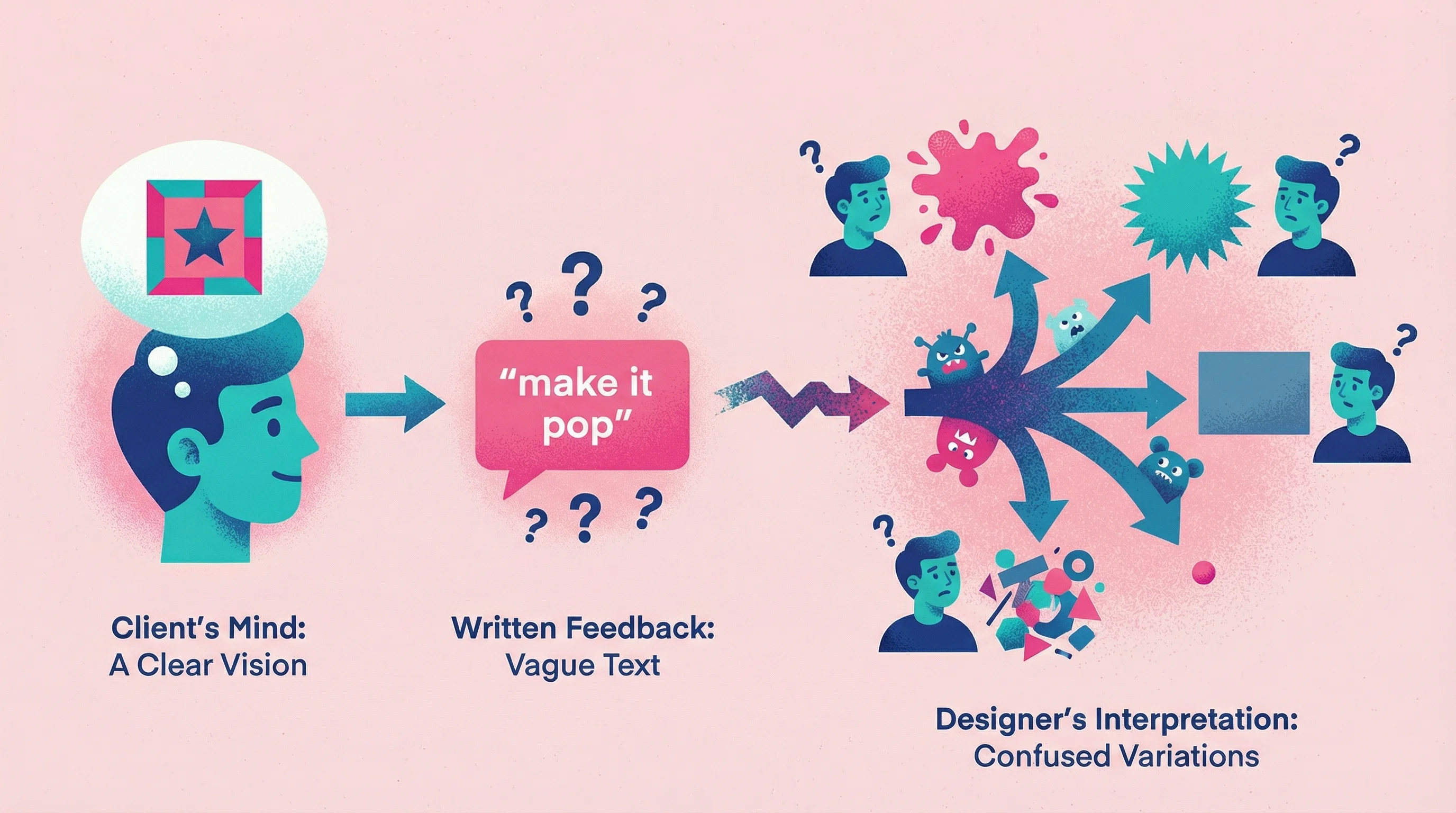
You won't know which interpretation is correct until you've tried three wrong directions or scheduled a call to interrogate them. Neither option is efficient.
We break down exactly why this happens—and what to do instead—in our deep dive on design feedback.
The Real Cost of Vague Feedback
Bad feedback isn't just annoying—it's expensive. A 2025 industry analysis found that 62% of outsourced projects went over budget, with poor communication identified as a major factor in over half of project failures. Even more striking: miscommunication extended project timelines by approximately 70%.
I experienced this recently working with an agency. Their feedback on a presentation deck was: "Can we make this specific slide more illustrative to bring it to life?" To a designer, that could mean a dozen different things—icons, custom illustrations, photography, infographics. That single vague comment triggered five rounds of emails back and forth, burning hours we could have saved with a two-minute video showing me what they had in mind. I was billing for those hours, but the agency lost out—paying for confusion instead of progress.
For a typical agency project, that pattern translates to:
Extra revision rounds: Each misinterpretation adds cycles
Scope creep: "That's not what I meant" erodes boundaries
Clarification calls: 30-minute syncs that could've been avoided
Relationship damage: Clients feel unheard; you feel micromanaged
A typical project loses 3-5 hours to feedback clarification. At agency rates, that's hundreds of dollars per project in unbilled time—multiplied across every active client.
What Is Video Feedback?
Video feedback is a method where clients record their screen while walking through your work and narrating their reactions. Instead of typing "this section feels off," they point directly at the element while explaining what's bothering them.
This approach flips the traditional feedback model. Rather than asking clients to translate visual reactions into written words (a process that loses critical information), video feedback lets them show you exactly what they mean in real time.
The advantages are significant. Academic research on feedback methods found that reviewers who gave video feedback were perceived as more supportive and provided more detail, while written comments tended to be short and often misinterpreted. A separate study on asynchronous audio and video feedback found it was more effective than text for conveying nuance—and recipients were three times more likely to apply the feedback they received.
Video feedback works because it carries tone, emphasis, and context that plain text lacks. When someone says "this area feels cluttered," you see exactly which area they mean. When they say "I don't love this color," you watch them point at the specific element. No interpretation required.
For a deeper comparison of tools that support this workflow, see our guide to video feedback tools.
Three Methods to Get Better Client Feedback
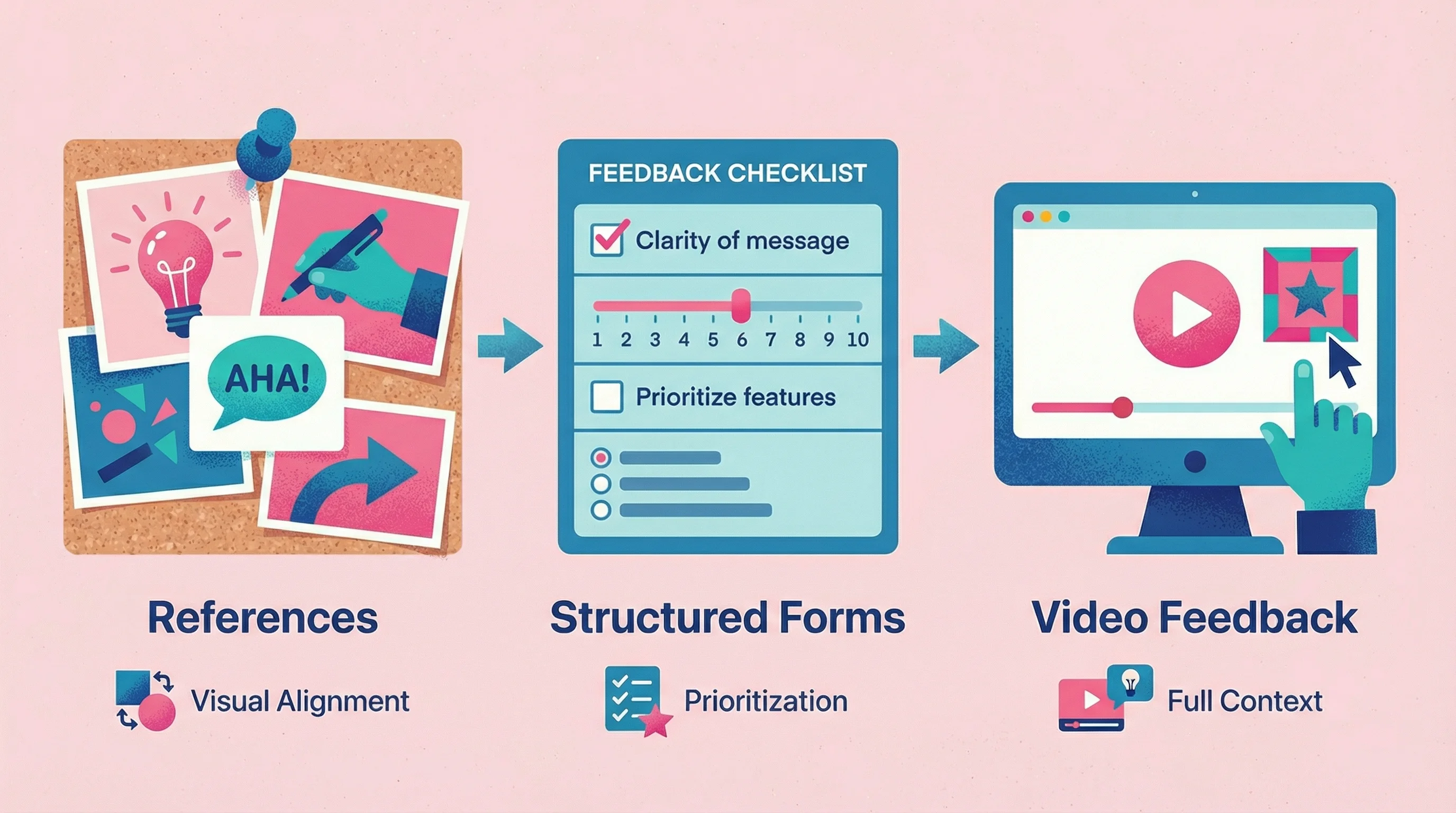
The goal: make it easier for clients to show you what they mean than to describe it in words.
Method 1: Reference-Based Feedback
Before starting any project, collect visual references from the client—not just your own mood boards.
How to implement:
Ask clients to gather 3-5 examples of work they love (competitors, unrelated brands, anything visual). For each example, have them identify what specifically they like, what they'd change, and how it relates to their vision.
Why it works:
Clients can articulate reactions to existing work more easily than abstract preferences. "I like how this site uses big photography but their typography feels too corporate" gives you more direction than "I want it to feel premium but approachable."
I saw this play out on a website project where the client's existing branding was very cybersecurity—digital, robotic, clean. But when the agency came to me, they said the client wanted something "like Miami Vice meets Tron. Lots of pixels." Immediately I knew there was a disconnect between their established brand and this new creative direction.
Instead of diving straight into design, I put together two mood boards: one leaning fully into the Miami Vice aesthetic, and another that blended that retro-digital vibe with their existing brand language. That 30-minute exercise surfaced the tension before I'd spent hours on the wrong direction. Turns out the client wanted the energy of Miami Vice, not the literal aesthetic—something we never would have uncovered from the brief alone.
As UX consultant Laia Tremosa notes in the Interaction Design Foundation, backing up verbal ideas with visuals keeps everyone "on the same page from the beginning." Research from Nielsen Norman Group confirms that collaboratively created mood boards can "reduce the chance of future miscommunications" by narrowing down style expectations early.
Limitation:
References help at project kickoff but don't solve feedback on your work during revisions.
Method 2: Structured Feedback Forms
Replace open-ended "send me your thoughts" with a client feedback form template that forces concrete responses.
Studies in design management suggest that structured feedback forms yield clearer input than simply asking "What do you think?" in an email. Clients often aren't sure how to articulate useful feedback on their own—giving them a framework solves this problem.
Client feedback form example:
Question | Purpose |
|---|---|
What's working well in this design? | Identifies what to preserve |
What's your biggest concern right now? | Prioritizes the most important issues |
On a scale of 1-5, how close is this to your vision? | Quantifies the gap between current and ideal |
What specific changes would move this to a 5? | Gets concrete, actionable direction |
Is there anything you'd like to see explored differently? | Opens the door for alternatives without inviting chaos |
Who else needs to review this, and by when? | Surfaces stakeholder alignment issues early |
For more methods beyond forms—including video, async, and hybrid approaches—check out our comparison of feedback collection tools.
Additional client feedback survey questions to consider:
Does this match the direction we discussed in our kickoff?
Are there any elements that feel off-brand?
What's the one thing you'd change if you could only change one thing?
Is there anything missing that you expected to see?
Why it works:
Structure prevents rambling and surfaces priorities. In one case study, a designer replaced a generic feedback email with a guided feedback questionnaire—4 out of 5 clients provided thorough responses, whereas previously many ignored the open-ended email entirely.
Limitation:
Still relies on written words. Clients can answer every question thoughtfully and you might still not understand what "explored differently" means.
Method 3: Video Feedback (The Show-Don't-Tell Approach)
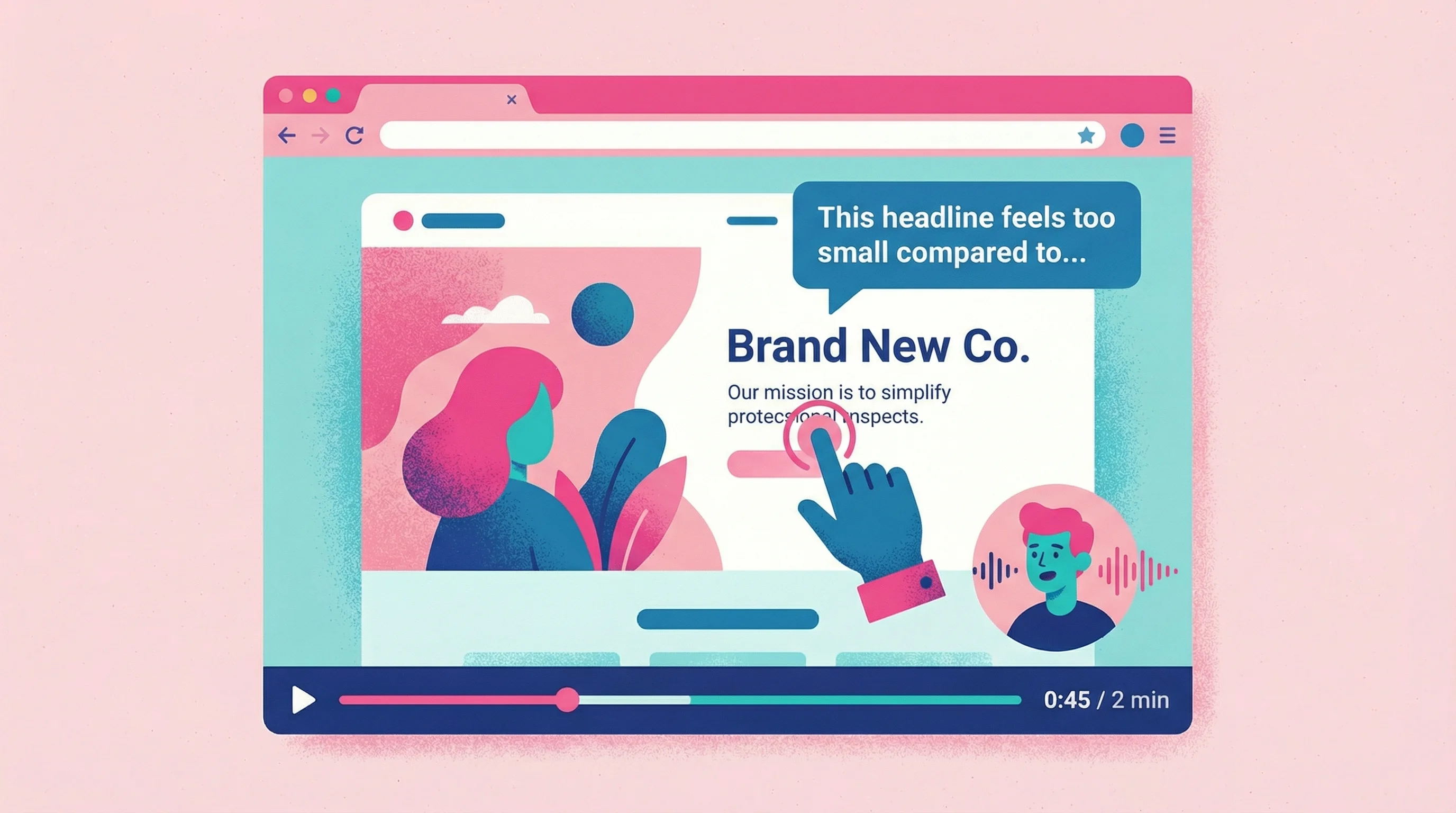
Ask clients to record their screen while walking through your work and narrating their reactions.
How to implement:
Instead of asking for written feedback, send a link where clients can record a quick video showing you exactly what they mean. They click, record, and you receive a video of them pointing at specific elements while explaining their thoughts.
Why it works:
A University of South Australia study found that recipients found video feedback easier to comprehend and act upon than text—it was more personalized and could actually demonstrate suggested changes instead of merely describing them. For creative work, an asynchronous video walkthrough ensures the client sees and hears the specific points, resulting in clearer understanding and more effective revisions.
This is actually why I built Talki. After five years working independently with agencies, SaaS companies, and startups, I noticed a pattern: my smoothest projects were always with clients who had strong opinions and wanted to express them. The difficult projects? Clients who kept feedback short and vague—either because they were too busy or because they didn't know how to articulate their ideas.
The thing is, those great clients weren't low-maintenance. They often wanted 30 to 45 minutes to walk me through their thinking. Sometimes I felt like a therapist, drawing out what they really meant. But I realized: if they were in a room by themselves, they could talk through their vision just fine. They didn't need me there nodding—they needed a way to express themselves on their own time.
That's the gap Talki fills. It gives clients the space to show you what they mean without the scheduling overhead of a call.
What to say to clients:
"I'd love to see exactly what you're thinking—would you mind recording a quick walkthrough? Just narrate your reactions as you look through the designs. It helps me understand your vision way better than email."
Video feedback tools that work:
For clients recording feedback to you, the simpler the better. Research on user onboarding shows that reducing friction can boost completion rates by up to 30% and speed activation by 20-25%. Tools like Talki let recipients record without creating accounts or downloading anything—they just click a link and record. The less friction, the more likely clients actually participate. For a full breakdown of options, see our video feedback tools comparison.
Limitation:
Some clients are camera-shy or feel awkward recording. For these clients, offer screen-only recording (no face) or fall back to structured forms.
Feedback Methods Compared
Method | Best For | Limitation |
|---|---|---|
Written email | Quick approvals | Loses nuance, invites vagueness |
Structured forms | Prioritizing concerns | Still relies on words |
Live calls | Complex discussions | Hard to schedule, not async |
Video feedback | Visual work, detailed reactions | Some clients camera-shy |
In-context annotations | UI/UX reviews | Doesn't capture reasoning |
How to Ask for Feedback from Clients (Scripts That Work)
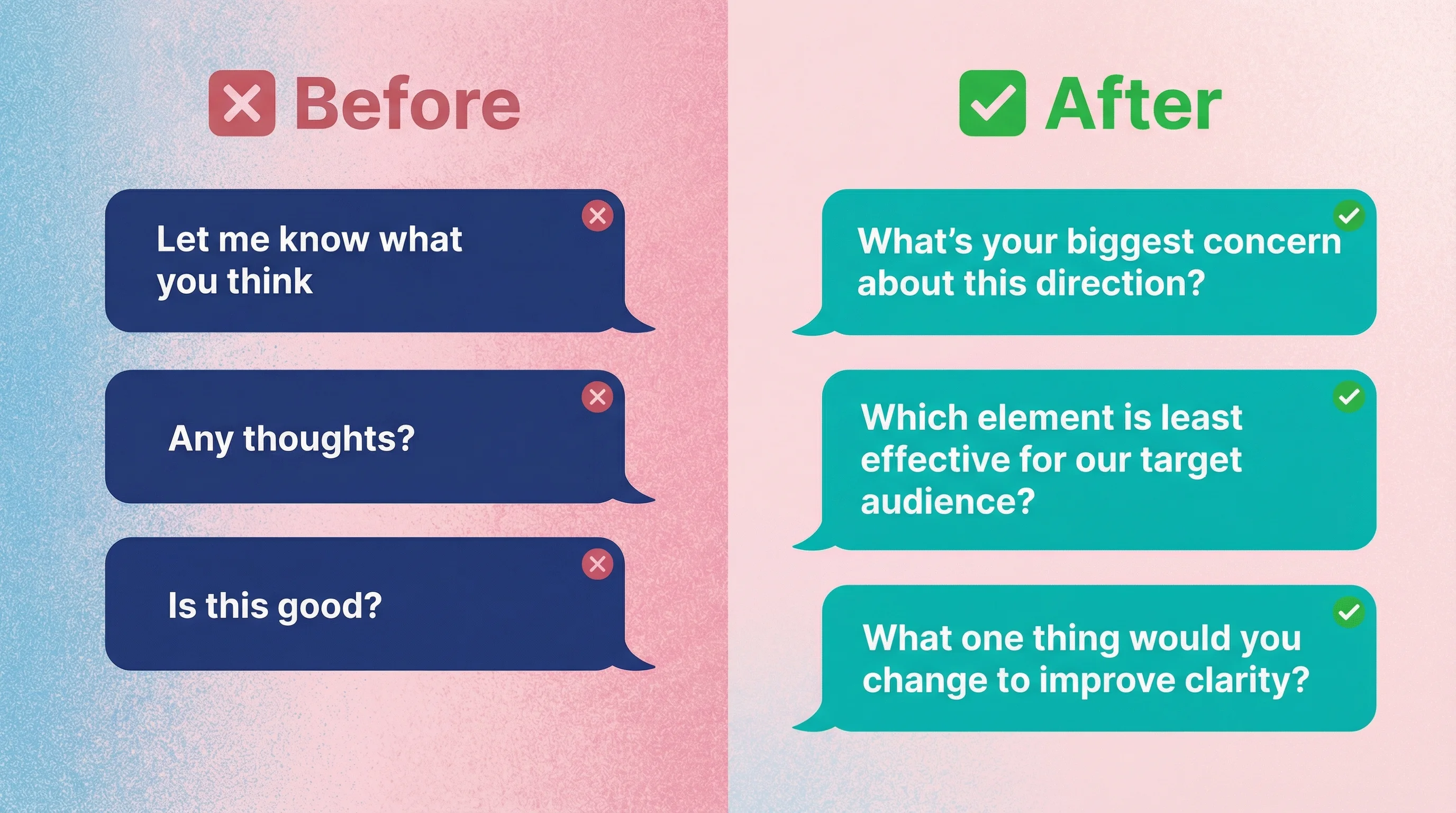
The way you request feedback shapes what you receive. Research from Gallup consistently shows that the specificity of a prompt directly affects feedback quality. As one feedback expert put it: "'Tell us what you think.' About what?"
Instead of: "Let me know what you think"
Try: "I'd love your gut reaction on two things: Does this capture the energy you described in our kickoff? And is there anything that feels off about the layout?"
Instead of: "Send over any feedback"
Try: "Could you record a quick 2-minute video walking through the design? Just narrate your reactions—what's working, what's not, and anything you'd want to see differently. [Link to record]"
Instead of: "Do you like it?"
Try: "On a scale of 1-10, how close is this to what you were imagining? What would move it up a point or two?"
For clients who give vague feedback
Follow up with: "When you say 'make it pop,' could you show me an example of something that has the energy you're looking for? Or record a quick video pointing to the specific areas that feel flat?"
Southwest Airlines dramatically improved the quality of customer feedback by asking context-specific questions right after certain actions. The same principle applies to design feedback: specific, well-timed prompts yield far more actionable responses than vague, open-ended requests.
Setting Up a Feedback System (Before the Project Starts)
The best time to fix feedback problems is before they happen. Research on design critiques shows that when participants know a feedback session is for input only (not final decisions), it creates psychological safety for honest feedback—ultimately reducing iterations needed to get things right.
When I left full-time roles at Fortune 500 companies to work independently, my first priority was reclaiming time lost to meetings and brainstorming sessions. Step one was moving communication to Slack—async by default, with calls only when truly needed. That alone gave me hours back each week.
But after a few years, I realized I could go further. The real time sink wasn't scheduled meetings—it was the unscheduled back-and-forth of clarifying vague feedback. Having clients record their screens and talk through their reactions eliminated that entirely. Now I set that expectation from the start of every project.
If you're looking to cut meeting time more broadly, we wrote a full guide on how to reduce meetings using async-first workflows.
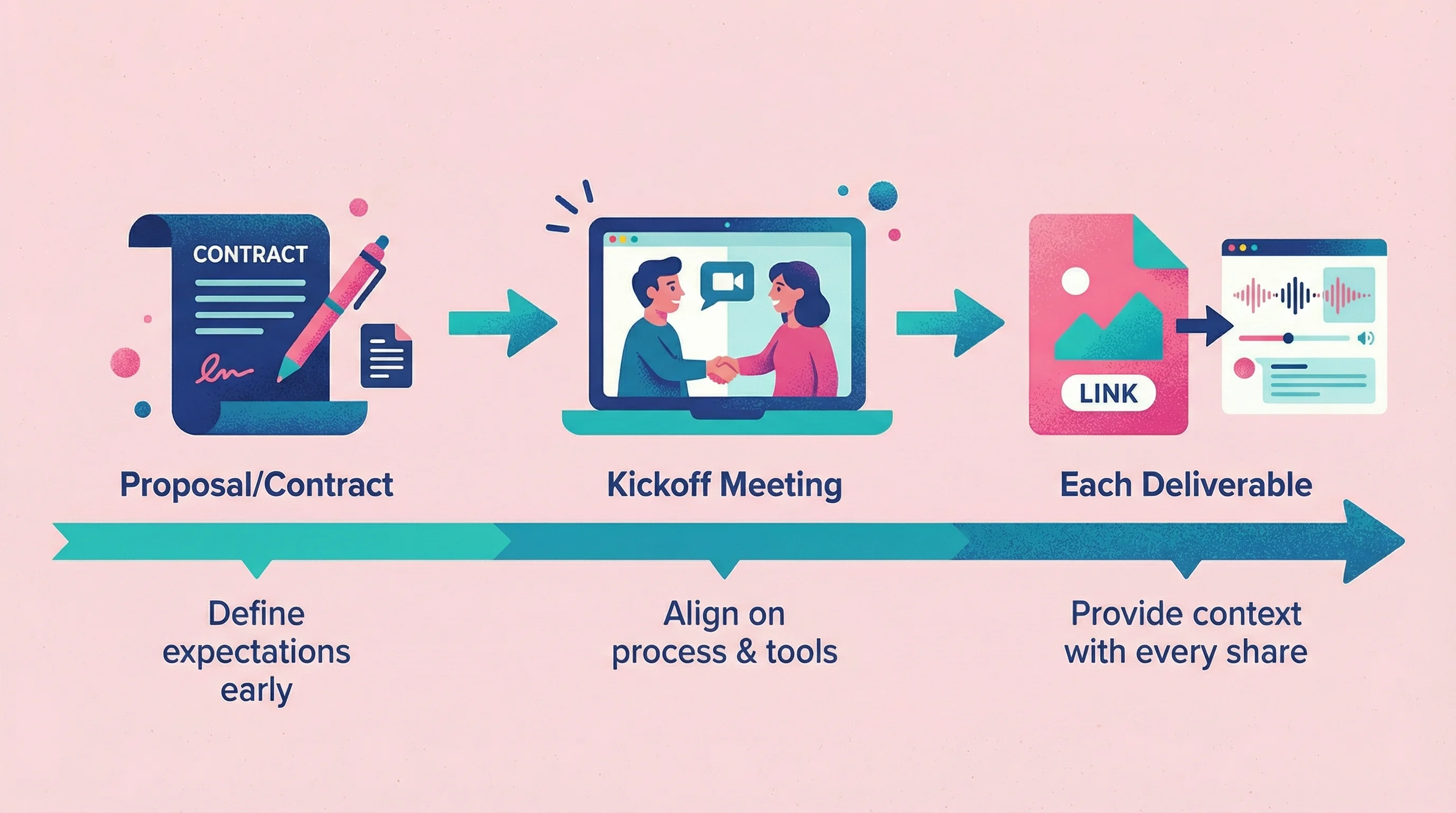
In your proposal or contract:
"Feedback rounds are most effective when we can see exactly what you mean. For each review, we'll send a link where you can record a quick video walkthrough of your reactions—no downloads required."
In your project kickoff:
"I've found that video feedback saves us both time and reduces revision rounds. When you review designs, I'll send you a simple link to record your screen while you walk through your thoughts. Most clients find it faster than typing, and I get much clearer direction."
With each deliverable:
"Here's the design for review. Could you record a quick video (2-3 minutes) showing me your reactions? Just click here: [link]. Walk through what's working, what's not, and anything you'd want to see differently."
Setting clear expectations from the outset means less room for misunderstandings. When both sides know the process—scheduled review rounds, defined feedback formats, clear decision-making steps—projects see fewer surprises and less rework.
Handling Stakeholder Alignment Issues
Project management research highlights that when key stakeholders aren't aligned or have differing expectations, conflicts and costly rework multiply. Digital agencies report that misaligned expectations almost invariably lead to disappointment, delays, or project failure.
I learned this the hard way during my years at Fortune 500 companies. We'd work on projects for weeks without ever speaking directly to the actual decision-maker—they were too senior, too removed from the day-to-day. So we'd finish our work, throw it over the wall, and cross our fingers. More often than not, ideas came flying back because someone high up in the organization—someone with zero context on what we'd been building or why—rejected it outright.
That experience shaped how I work now. I ask uncomfortable questions upfront: Who has final approval? Have they seen the brief? What's their relationship to the project? It's awkward, but it's saved me from building for the wrong audience countless times.
Another source of chaos: unclear roles. When approval authority is murky or one stakeholder isn't on board, teams face late changes and friction that increase rework exponentially. Using a RACI framework at project kickoff can help clarify who's responsible, accountable, consulted, and informed for each decision.
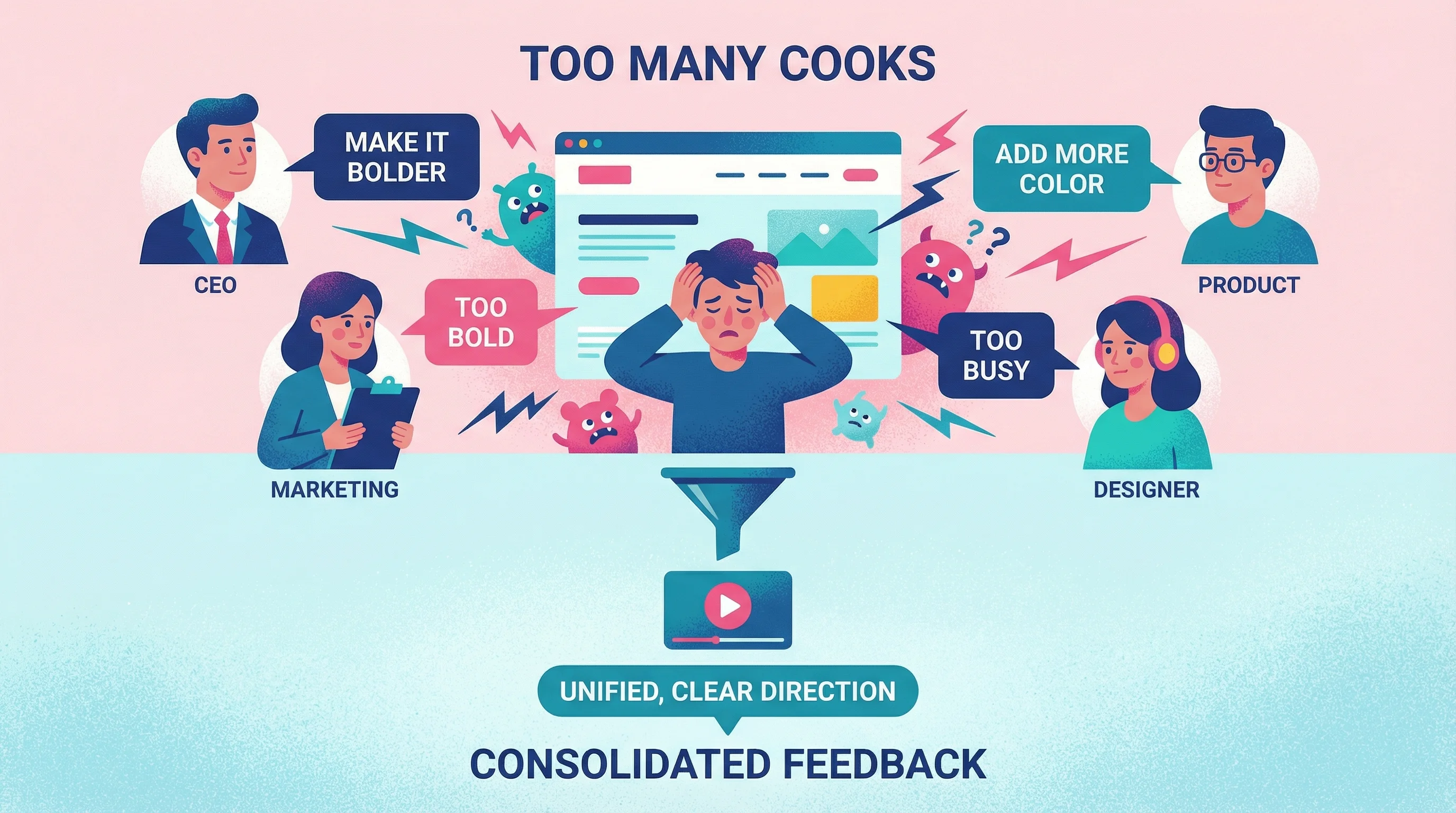
When multiple stakeholders give conflicting feedback
Don't try to synthesize: You'll get blamed for the wrong choice.
Do say: "I'm getting some different perspectives from the team. Could you consolidate into one video walkthrough with the final direction? That way I'm working from a single source of truth."
When you don't have direct access to decision-makers
Give your main contact a shareable link and ask them to collect feedback from their team in one consolidated video. This prevents you from becoming a middleman for conflicting opinions.
When roles and responsibilities are unclear
Address this in your kickoff: "Who has final approval on design decisions? I want to make sure we're getting feedback from the right people at the right time." Best practices recommend explicitly outlining roles and decision rights at the start—this minimizes the cycle of revisions driven by internal disagreements.
Handling Difficult Feedback Scenarios
Even with good systems, some feedback situations require careful navigation.
When clients can't articulate what they want
Don't ask: "What would you like instead?"
Do ask: "Let me show you three different directions. Record a quick reaction to each one—even if you don't love any of them, your reactions will help me understand your taste."
When feedback contradicts earlier direction
Don't say: "But you said you wanted it bold."
Do say: "I want to make sure I understand the shift—could you record a quick video showing me what's not feeling right? Sometimes seeing your reaction helps me understand better than words."
When clients repeatedly give vague feedback despite your prompts
Some clients will continue to give vague feedback regardless of your system. In these cases, try presenting options with clear tradeoffs: "Option A prioritizes readability, Option B prioritizes visual impact. Which direction resonates more?" Binary choices are easier than open-ended reactions.
FAQ
How do I get client feedback faster?
Make it easier to give. Video feedback often comes faster than written because clients don't have to craft careful prose—they just talk. Links that don't require downloads or accounts remove another barrier. Research shows that eliminating unnecessary steps can raise user completion rates by up to 30%.
What if clients refuse to record video?
Don't force it. Some people are camera-shy. Offer screen-only recording (no face), or fall back to structured feedback forms. The goal is clarity, not a specific medium.
How many feedback rounds should I include?
Two to three rounds is standard for most creative projects. More importantly, make each round count by getting clear feedback the first time. Video walkthroughs often cut total rounds because there's less back-and-forth clarification.
How do I get stakeholder feedback when I don't have direct access?
Give your main contact a shareable link and ask them to collect feedback from their team in one consolidated video. This prevents you from becoming a middleman for conflicting opinions.
What's the difference between video feedback and Loom?
Loom is designed for one-to-many communication—you record and send to others. Video feedback tools flip this model, enabling many-to-one collection. You send a link, multiple stakeholders record their reactions, and all that feedback comes back to you in one place. It's the difference between broadcasting and collecting. For a full breakdown of options, see our Loom alternatives guide.
What should I do if feedback still isn't clear after video?
Sometimes even video leaves ambiguity. In these cases, create two quick mockups showing your interpretation of their feedback and ask: "Is it more like A or more like B?" Visual choices are faster to react to than open-ended questions.
Client Feedback Best Practices (Summary)
Based on 15 years of working with clients on creative projects, here's what actually works:
Make showing easier than telling — Video feedback beats written every time
Set expectations before the project starts — Explain your feedback process in the kickoff
Use structured prompts, not open-ended requests — "What's your biggest concern?" beats "Any feedback?"
Consolidate stakeholder input — One source of truth, not five conflicting emails
Reduce friction to zero — No logins, no downloads, no barriers
The Bottom Line
Clear client feedback isn't about finding better clients—it's about making clarity the path of least resistance. When showing you is easier than telling you, you stop playing 20 questions and start getting direction you can actually use.
The projects that go smoothly aren't the ones with easygoing clients. They're the ones where the feedback system made misunderstanding nearly impossible.